By Joe Trent | October 21, 2026
I’ve been building websites since 2006. Over the years, I’ve used different tools and hosting companies, but like millions of other website owners, I eventually settled on WordPress.
Today, I have six WordPress websites hosted under one account at InMotion Hosting. One is my primary domain, and the others are add-on domains.
The arrangement works. My hosting isn’t outrageously expensive, and WordPress does what I need it to do.
But recently, I started asking myself a question:
Why am I paying for traditional web hosting when AI can help me build websites that don’t need most of the software I’m paying to run?
That question led me down an interesting rabbit hole involving static websites, Cloudflare, GitHub, AI coding tools, and surprisingly inexpensive email hosting.
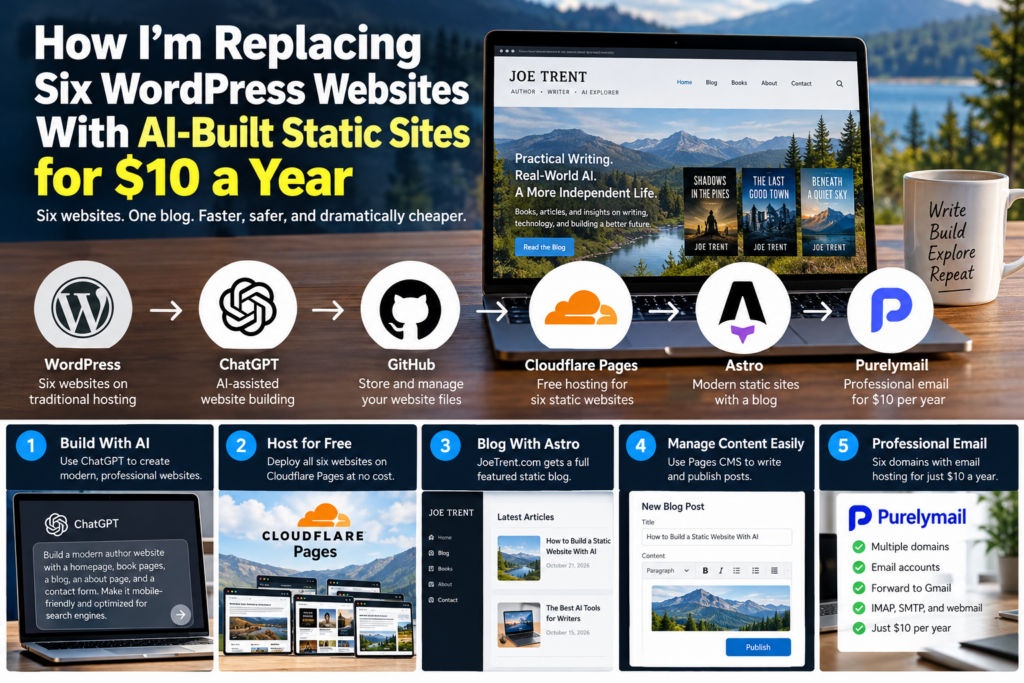
After researching the options, I’ve put together a plan to replace all six WordPress websites with static sites, give JoeTrent.com a fully functional blog, and potentially reduce my combined website and email hosting costs to just $10 per year.
I haven’t made the switch yet. This article documents my research and the steps I intend to follow when I’m ready.
And if you’re thinking about replacing WordPress with something faster, less expensive, and easier to secure, you might find this useful too.
Why I’m Considering Leaving WordPress
Let me be clear: I don’t hate WordPress.
It’s an impressive piece of software. You can build almost anything with it, and there are thousands of themes and plugins available.
But WordPress comes with responsibilities.
You have to keep the core software updated. You have to monitor plugin and theme updates. You have to worry about security vulnerabilities, database backups, and whether some plugin update will break your website.
Then there’s the hosting.
Traditional WordPress hosting requires a server environment capable of running PHP and a database. Even when your website is relatively simple, that infrastructure has to be maintained.
For most of my websites, I don’t need any of it.
An author website that displays book covers, descriptions, buy buttons, and a contact form doesn’t necessarily need WordPress.
It just needs to display information.
That’s where static websites come in.
What Is a Static Website?
A static website consists primarily of ready-made HTML, CSS, JavaScript, and image files.
When someone visits the site, the hosting provider delivers those files directly to the visitor’s browser.
There’s no WordPress installation processing each page request. There’s no database query required to generate a typical page.
The website is already built.
This doesn’t mean it has to look like something created in 1998.
Modern static websites can have beautiful layouts, interactive menus, image galleries, responsive mobile designs, animations, and many of the features people expect from professional websites.
The difference is what happens behind the scenes.
A traditional WordPress website dynamically generates many of its pages.
A static website generator creates those pages ahead of time.
And that difference opens up some interesting possibilities.
Can AI Build a Professional Static Website?
Yes. This is one of the developments that makes this project particularly interesting to me.
With AI coding tools like ChatGPT, you can describe the kind of website you want and get help creating the HTML, CSS, JavaScript, layouts, and other files needed to build it.
For example, I could request:
“Build a modern author website with a homepage, book catalog, individual book pages, newsletter signup, about page, and contact page. Make it mobile-friendly and optimize the pages for search engines.”
AI can help produce that website’s source code.
Of course, the results still need testing. AI-generated code can contain bugs, accessibility problems, security issues, and design mistakes.
But the technology has dramatically reduced the amount of manual coding required to build a custom website.
I don’t need to start by shopping for a WordPress theme, installing a dozen plugins, and configuring an entire content management system.
I can start with the website itself.
And if the finished site consists of static files, I can host it very inexpensively.
Possibly for free.
Cloudflare Pages: Free Hosting for Six Websites
The service I’m planning to use is Cloudflare Pages.
Cloudflare operates a large global network and provides a platform for deploying static websites.
The part that caught my attention is its free tier.
As of October 2026, Cloudflare Pages offers:
- Free static website hosting within its plan limits.
- Custom domain support.
- HTTPS encryption.
- Global delivery of static files.
- Integration with GitHub.
- Automatic deployments when website code changes.
- Up to 500 builds per month on the free plan.
For my purposes, those allowances should be more than sufficient.
I don’t expect to update all six websites several times a day.
In fact, five of them may go weeks or months without significant changes.
And I can manage all six under a single Cloudflare account.
Estimated annual hosting cost for all six websites: $0.
There are limits, of course. Cloudflare places restrictions on build frequency, file sizes, and certain dynamic functions. Those limits need to be considered before choosing it for a large or complicated website.
But for a handful of small author and business websites, it’s a very attractive option.
Official documentation: Cloudflare Pages limits.
How GitHub Fits Into the Picture
This was another part of the process I wanted to understand.
If Cloudflare hosts the websites, where do the website files live?
One convenient answer is GitHub.
GitHub stores the source code for a project and keeps a history of changes.
Here’s how I envision the workflow:
- Use ChatGPT or another AI coding tool to help build a website.
- Save the website’s files in a GitHub repository.
- Connect that repository to Cloudflare Pages.
- Let Cloudflare build and publish the website.
- When the website needs updating, make the changes and publish them to GitHub.
Cloudflare can automatically deploy the updated version.
I can create a separate repository for each of my six websites.
That also means I have version history. If a change breaks something, I can return to an earlier version of the code.
And because I have the source files, I’m not permanently locked into one website hosting provider.
But What About Blogging?
This is where my plan gets a little more interesting.
Five of my websites can be straightforward static sites.
However, I want JoeTrent.com to become an active blog covering AI tools, practical tutorials, online businesses, website building, and ways to use emerging technology.
That means I need the ability to regularly publish new articles.
Fortunately, a static website can absolutely have a blog.
The technology I’m considering is called Astro.
Why Astro?
Astro is a modern framework designed for building fast, content-focused websites.
It works especially well for blogs, documentation sites, and websites with lots of written content.
Astro can take an article written in Markdown and generate a complete HTML page.
For example, a post might have a URL like:
joetrent.com/blog/how-to-build-a-static-website/
The page can include images, headings, links, metadata, and all the usual elements of a blog article.
Astro can also support features such as:
- Blog categories and archives.
- Featured images.
- RSS feeds.
- XML sitemaps.
- Search-engine-friendly URLs.
- Related articles.
- Responsive layouts.
The resulting pages can still be hosted as static files on Cloudflare.
In other words, JoeTrent.com can have a blog without requiring a live WordPress installation or traditional database.
How Will I Publish Articles Without WordPress?
One thing I don’t want is to manually edit website code every time I write a blog post.
I’d prefer an editor where I can type an article, add images, and click Publish.
That’s where Pages CMS comes in.
Pages CMS is a free, open-source content management system designed to work with websites stored on GitHub.
Instead of storing articles in a traditional website database, it edits the content files in the GitHub repository.
Here’s how my publishing process could work:
- Open Pages CMS in my browser.
- Create a new blog post.
- Write or paste in my article.
- Add a featured image, title, description, and category.
- Save the post.
- Let GitHub and Cloudflare automatically rebuild the website.
The article then appears on JoeTrent.com.
That gives me much of the convenience I enjoy with WordPress without requiring WordPress itself.
I’ll still need to configure the CMS, connect it to GitHub, and secure the publishing account. But once that setup is complete, publishing should be straightforward.
Are Static Websites More Secure Than WordPress?
Security is another major reason I’m interested in making this change.
WordPress is frequently targeted by automated attacks. Many successful compromises involve vulnerable plugins, themes, stolen credentials, or outdated server-side software.
Static websites eliminate many of those potential entry points.
For example, a static site without a server-side database isn’t vulnerable to SQL injection against a WordPress database, because there is no such database.
It also doesn’t expose the familiar WordPress administrative login page.
There are fewer moving parts.
That doesn’t mean a static website is impossible to hack.
An attacker could still compromise a GitHub account, steal hosting credentials, hijack DNS settings, exploit an interactive service, or take advantage of malicious JavaScript.
That’s why my plan includes two-factor authentication, carefully managed account access, secure contact forms, appropriate security headers, and backups.
But for the kind of websites I operate, removing WordPress and its plugins should substantially reduce the attack surface.
An added benefit is maintenance. No more checking six separate WordPress dashboards to see which plugins need updating.
The Email Problem: Six Domains, One Gmail Inbox
My websites aren’t the only things hosted at InMotion.
I also have professional email addresses associated with the six domains.
Each domain has its own address, and all of those addresses forward to my personal Gmail account.
This setup has worked well for me for years.
I open Gmail in my browser, read messages from all six domains, and reply using the professional address associated with each incoming message.
I wanted to preserve that arrangement without subscribing to Google Workspace.
That’s when I discovered Purelymail.
Purelymail: Email Hosting for $10 Per Year
Purelymail offers a simple pricing plan costing $10 per year.
It supports multiple custom domains, email accounts, aliases, forwarding, SMTP, IMAP, and webmail.
Unlike providers that charge separately for every mailbox, Purelymail allows multiple domains and users under one account.
There are soft resource limits. Customers who use unusually large amounts of storage or bandwidth may need to switch to usage-based pricing.
For six relatively low-volume domain addresses, however, it looks like a good fit.
I could move my domain email hosting to Purelymail, configure forwarding to Gmail, and continue receiving everything in my familiar inbox.
There is one complication.
Google’s January 2027 Gmail Changes
Google has announced that starting in January 2027, personal Gmail accounts will no longer support sending email from third-party addresses using Gmail’s existing “Send as” feature.
That affects people like me who use Gmail’s website to reply from independently hosted domain addresses.
Incoming email forwarding can still deliver messages into Gmail.
But after that change, forwarding and inexpensive SMTP hosting alone won’t allow me to continue my current professional reply workflow inside Gmail’s website.
I’ll need to send professional replies through a separate webmail interface, an email application, or another supported solution.
Purelymail provides its own webmail interface, so that may be my simplest fallback.
I still intend to use my free Gmail account as my primary inbox. I just need to accept that sending messages from my six professional addresses may require a separate step.
I’m not interested in paying for Google Workspace simply to preserve that one convenience.
For details, see Google’s official explanation of the Gmail changes.
My Estimated Annual Website and Email Hosting Costs
Here’s what the planned setup looks like financially.
| Service | Annual cost |
|---|---|
| Cloudflare Pages for six static websites | $0 |
| GitHub repositories | $0 |
| Astro static website framework | $0 |
| Pages CMS blog editor | $0 |
| Purelymail email hosting | $10 |
| Total | $10/year |
That’s a remarkably inexpensive arrangement.
It doesn’t include domain registration or renewal fees, which I’d still have to pay.
It also doesn’t include any optional paid AI tools, newsletter platforms, premium services, or the time involved in building and maintaining the websites.
The $10 figure assumes I remain within the hosting providers’ free tiers and Purelymail’s simple pricing allowance.
Still, the potential savings are hard to ignore.
My Step-by-Step Migration Plan
I don’t intend to shut down InMotion and move everything at once.
That would introduce unnecessary risk.
Instead, I’m planning a gradual migration.
Phase 1: Inventory the Existing Websites
Before building anything, I’ll document all six domains.
For each website, I’ll record:
- Existing pages and URLs.
- Images and downloadable files.
- WordPress plugins and important functionality.
- Contact forms.
- Email addresses and forwarding rules.
- Current DNS records.
- Existing search-engine traffic.
- Backups of website files and databases.
This is particularly important for JoeTrent.com.
If existing articles have been indexed by Google, I don’t want to lose their search traffic because I carelessly change URLs.
Wherever practical, I’ll preserve the existing page addresses. If URLs must change, I’ll configure permanent redirects.
Phase 2: Set Up GitHub and Cloudflare
Next, I’ll create or prepare my GitHub and Cloudflare accounts.
I’ll enable two-factor authentication on both.
Then I’ll create a test repository for the first website and connect it to Cloudflare Pages.
At this stage, I won’t change any existing domain settings.
Cloudflare provides temporary project addresses, so I can build and test the new website without interfering with the live WordPress version.
Phase 3: Build the New JoeTrent.com
This will be the most involved website.
I’ll use Astro and AI-assisted coding to create a new design for JoeTrent.com.
The site will include a homepage, about page, blog, article categories, and whatever additional pages I decide are useful.
I’ll configure Pages CMS to make publishing new articles convenient.
I’ll also add the SEO basics: unique page titles, meta descriptions, canonical URLs, structured data where appropriate, an XML sitemap, and mobile-friendly navigation.
Before launching, I’ll test the design, internal links, publishing workflow, accessibility, and performance.
Phase 4: Build the Other Five Static Websites
Once JoeTrent.com is working properly, I’ll move on to the remaining domains.
These should be much simpler.
Most will need some combination of a homepage, book or product information, an about page, and contact information.
I can reuse components and layouts where appropriate, while giving each website its own identity.
Since these sites won’t need a blogging system, they should be relatively easy to build and maintain.
Phase 5: Migrate Email to Purelymail
Email is the part of the project where I’ll be especially careful.
I plan to configure Purelymail, add the six domains, and set up the necessary email accounts, aliases, and forwarding rules.
I’ll also need to configure the correct DNS records, including MX, SPF, DKIM, and DMARC.
Those records control where email is delivered and help receiving providers authenticate outgoing messages.
I’ll test incoming mail, forwarding to Gmail, and outgoing mail from every domain.
I’ll also keep the Gmail sending changes in mind and establish a working reply method before depending on the new system.
One important detail: Cloudflare offers its own free incoming email forwarding service, but it isn’t necessary if Purelymail is already managing incoming email and forwarding. Both services should not be configured to compete for the same domain’s MX records.
Using Purelymail for both email hosting and forwarding will likely be the simpler arrangement.
Phase 6: Connect the Existing Domain Names
Once each replacement website has been tested, I’ll connect the real domain name to its Cloudflare project.
I’ll carefully review DNS records before changing anything, particularly email-related records.
I want the website migration and email migration to be controlled processes, not one giant change where it’s difficult to tell what went wrong.
After switching a domain, I’ll test its pages, HTTPS certificate, contact forms, redirects, and email delivery.
Phase 7: Cancel InMotion Only When Everything Works
Finally, after all six sites are running properly, email has been migrated, backups are verified, and nothing important depends on the old server, I’ll be able to cancel my InMotion hosting plan.
Not before.
The goal is to save money without creating unnecessary problems.
Will Static Websites Hurt My Google Rankings?
Not inherently.
Google doesn’t require websites to run WordPress, PHP, or a database.
It indexes the pages visitors and search engines can access.
Static websites can perform exceptionally well because they often load quickly and deliver content without unnecessary processing.
But moving a website can hurt rankings if it’s done carelessly.
Broken links, missing pages, changed URLs, deleted articles, incorrect redirects, or missing metadata can all cause problems.
For JoeTrent.com, I’ll be particularly careful to preserve existing content and important URLs.
I’ll also want the new site to become a useful resource for people interested in AI.
That means publishing genuinely helpful articles based on real projects, experiments, and practical experience.
I don’t expect Google rankings simply because an article contains popular AI keywords.
My goal is to build a library of useful tutorials that answer questions people are actually asking.
This website migration itself will be one of those tutorials.
What I Like Most About This Approach
The biggest attraction isn’t actually the price.
It’s the independence.
I want to own my website files, control my domain names, choose my hosting provider, and avoid maintaining software that I don’t really need.
I also like the idea of using AI as a practical website-building tool.
Instead of subscribing to another expensive website builder, I can use AI to help create exactly the kind of websites I want.
If I need to update a layout, add a feature, or create a new page, I can work directly with the underlying code.
And if I decide Cloudflare isn’t the right provider someday, I can take those files somewhere else.
There’s something appealing about that.
Frequently Asked Questions
Can you really host six websites for free?
Yes, if they’re suitable static websites and remain within the free hosting provider’s limits. Cloudflare Pages supports multiple projects, custom domains, and free static hosting within its published allowances.
Can ChatGPT build a complete static website?
ChatGPT can help write the website code, layouts, styling, and configuration files. It can also help troubleshoot errors and prepare the site for deployment. The finished website still needs testing, and someone must connect the project to the appropriate accounts and hosting platform.
Can a static website have a blog?
Absolutely. A static site generator like Astro can create individual blog pages from content files. A tool such as Pages CMS adds a browser-based editing interface.
Are static websites safer than WordPress?
Generally, they have a smaller attack surface because they don’t require a live WordPress installation, plugins, or a database. They still need secure account credentials, properly configured services, and protection against compromised dependencies.
Can I use my own domain with Cloudflare Pages?
Yes. You can connect an existing domain name to a Cloudflare Pages project. You don’t necessarily have to transfer your domain registration to Cloudflare.
Can I keep Gmail while using Purelymail?
Yes, for receiving forwarded messages. However, Google’s announced January 2027 changes will end the existing third-party “Send as” feature in personal Gmail. Sending professional replies will require a different workflow.
Is Purelymail really only $10 per year?
Its simple pricing plan is advertised at $10 per year as of October 2026. It supports multiple domains and mailboxes, with soft usage limits and an alternative resource-based pricing option.
Can AI-built static websites rank in Google?
Yes. Their ability to rank depends on factors such as useful content, accessibility, crawlability, technical SEO, and the quality of the overall website—not whether the HTML was created manually or with AI assistance.
Final Thoughts
I’ve spent years building and managing websites, and this is the first time I’ve seriously considered eliminating traditional web hosting across all my domains.
Not because traditional hosting is bad.
But because the combination of modern static website technology, AI coding tools, and free hosting platforms has changed what’s possible.
My plan is straightforward:
Six websites. One blog. Cloudflare hosting. Purelymail email. A target hosting bill of $10 per year.
I’ll start with JoeTrent.com, document the process, and eventually turn what I learn into additional AI tutorials.
If this works as expected, I’ll have faster websites, fewer maintenance headaches, a smaller security attack surface, and a considerably lower hosting bill.
And if I run into problems along the way, I’ll write about those too.
That’s the kind of practical AI content I want to publish here: not just what the technology promises, but what actually happens when you put it to work.
Resources Mentioned
- Cloudflare Pages — Static website hosting
- Cloudflare Pages documentation — Deployment guides and plan limits
- Astro — Static website framework
- GitHub — Source code hosting and version control
- Pages CMS — Visual editor for GitHub-based websites
- Purelymail — Inexpensive custom-domain email hosting
- Google’s Gmail account changes — Information about the January 2027 changes
Pricing and service limits were researched in October 2026 and may change. This article documents a planned migration; it isn’t a report of a completed project.